31 Aralık 2015 Perşembe

A look back at Google Maps in 2015

2016 is just around the corner. Before we pop champagne and ring in the New Year, let’s take a look back at the enhancements we’ve made to Google Maps over the past year. From using Google Maps offline to discovering new places with Explore, we’re proud to not only get you from point A to point B quickly and easily, but to also help you explore the world around you with confidence.

Below is a list of the new features you might’ve missed, along with a handy chart showing you where you’ll find them. If you got a new phone this holiday season, now’s the time to give the Google Maps app a go.

2015 Google Maps New Features
  1. 2015 is ticking away, but you can take a look back at the places you’ve traveled with Your Timeline.
  2. Always know when your favorite stores are open with up-to-date holiday hours and alerts.
  3. Whether you’re in a parking garage with no signal or traveling in country with expensive data, search for places, get directions, and turn-by-turn navigation–all offline.
  4. Always stay on the fastest route and beat bumper-to-bumper traffic with real-time traffic updates and dynamic re-routing.
  5. Never run low on fuel with up-to-date gas prices in search results and on the map.
  6. Make quick pit stops without long detours–search for places along your route without leaving navigation mode.
  7. Find the best local spots to eat and drink with curated recommendations.
  8. Get all your travel options and compare ETAs across driving, walking, biking and transit–all on one screen.
  9. Get the scoop on when the lines are shortest and shops least crowded by checking businesses’ most popular times–by day, by hour.
  10. Get the lay of the land before you arrive by using Street View thumbnail.
  11. Never miss a bus or train with real-time transit information (schedules, fares, updates) in more than 18,000 cities across 64 countries.
  12. Get directions, turn-by-turn navigation and real-time traffic updates from your wrist with the Google Maps app on Android Wear and Apple Watch.
To see these new features in action, take a look back at our Maps Minutes Holiday Hacks series.


2015 New Features by iOS and Android Availability


Join us in a virtual toast to a New Year of helping you explore and navigate your far away travels as well as your everyday life.


Posted by the Google Maps team


29 Aralık 2015 Salı

Maps Minutes Hack #9: Get home quickly and safely on New Year’s Eve

Part of our series on how to save time this holiday season with Google Maps.

Whether you’re heading to a friend’s house for a cozy gathering, going to watch the ball drop in Times Square or attending an extravagant masquerade ball, the last thing you want to worry about on New Year’s Eve is driving.

With the Google Maps app, you can get where you’re going without ever getting behind the wheel. Earlier this year we launched a new feature that allows you to see various transportation options and compare travel times–all on one screen.

Once you enter your destination in the Google Maps app, you’ll see four options to get there: driving, walking, biking or transit (bus/train). You can quickly compare ETAs and switch between the transportation modes for more details and up-to-date information for each option.


If you’re heading to a casual celebration not so far from home, walking or public transit might be your best option. The Google Maps app will give your walk time ETA along with a few transit route options with real-time schedules, updates and fares.


Google Maps can also help you grab an Uber, if arriving by bus or train isn’t your holiday style. You can see the estimated trip duration, pickup time and estimated cost once you scroll down to the bottom of the app's transit option screen.

Stay safe with Maps Minutes Hacks and enjoy your New Year’s celebrations wherever they take you.

Posted by Dai Pham, Head of Geo and Google Maps Marketing

24 Aralık 2015 Perşembe

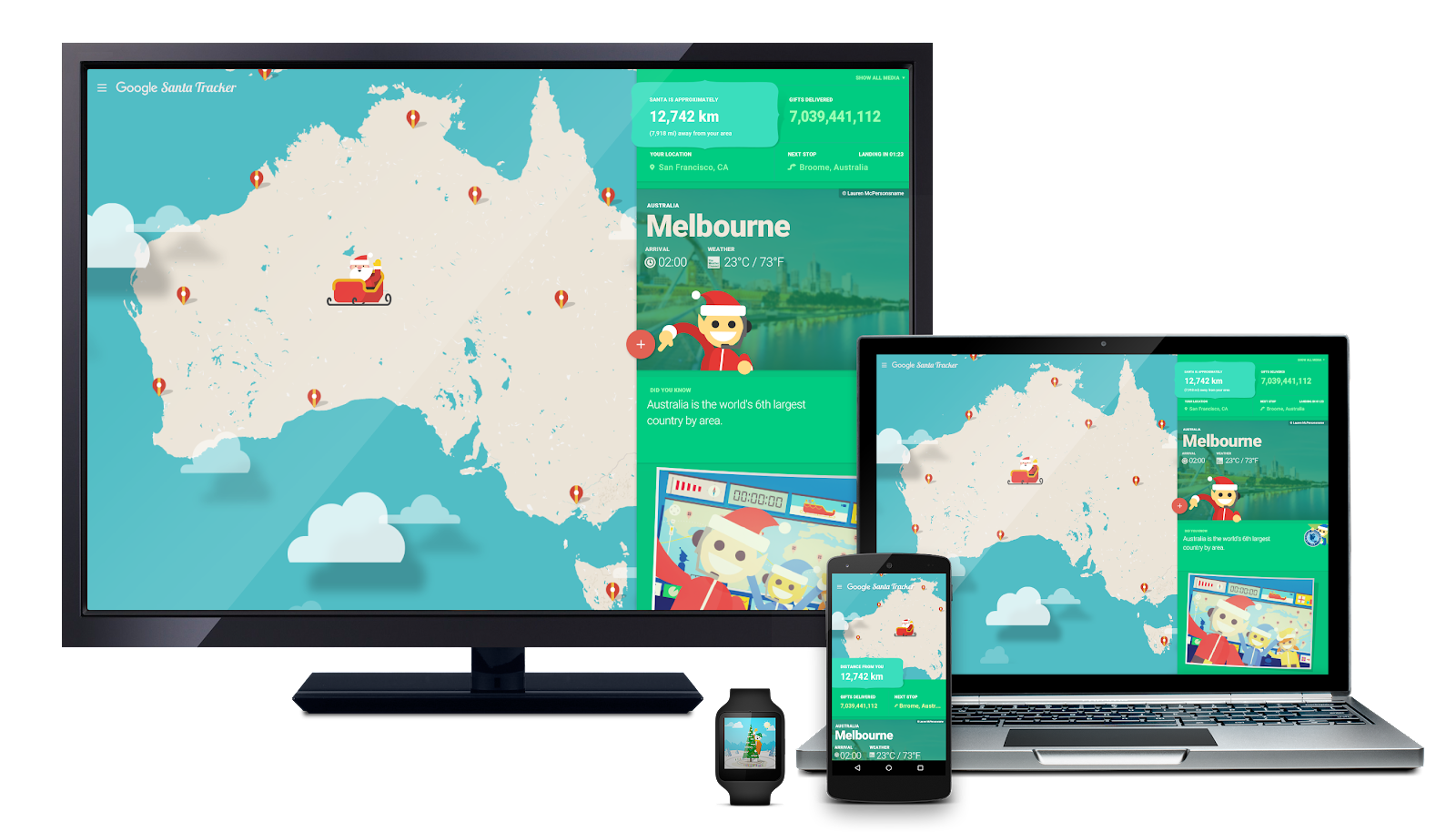
‘Tis the season for Santa Tracker

‘Tis the night before Christmas, at our northernmost pole
And all through Santa’s Village it’s almost time to roll!
The elves have been working hard for this night
Santa’s village is abuzz—tonight’s the big flight!

Google’s Santa Tracker launches today—
And it’s time to follow the jolly man's sleigh.
He’s off on his trip ‘round the world
Delivering toys to all good boys and girls.
SantaTracker2015_Tracker-on-all-devices.png
You’ve got a front-row seat to the show
Just fire up Google Maps to see where he goes.
Thanks to the elves’ precisely coded route
Santa and his reindeer will fly swiftly—look out!
SantaTracker2015_Code-Boogie_on-devices (2).png
Now the sleigh tuning’s done,
Tales of global traditions spun,
Every gift in the sleigh gently placed,
Wrapped with care, without haste.

The reindeer are prancing and eager to fly,
Ready for Santa’s trip through the sky.
With so little time to get their job done—
They may need your help on this gift-giving run.

So keep the translation tool handy;
Geography trivia would also be dandy.
There’s no telling what Santa might need
Traveling from Brisbane to Lima to Leeds.
SantaTracker2015_World-Trivia_on-devices.png
Now Dasher! Now, Dancer! Now, Prancer and Vixen!
Join in on the fun—find out what you’re missin’!
On Maps! On Android, Chromecast and Google.com!
There’s something for everyone, from kids to mom.

So watch that sleigh as it takes to the air,
And wherever you are, St. Nick will soon be there.
To borrow a phrase, as Santa takes flight—
"Happy holidays to all, and to all a good-night!"


Posted by Luke Mahé, Chief Excitement Officer

23 Aralık 2015 Çarşamba

Maps Minutes Hack #8: Set your home and work addresses for easy navigation

Part of our series on how to save time this holiday season with Google Maps.

It’s crunch time. There are holiday parties to attend and last-minute gifts to be bought and wrapped. When the holidays are only days away even the small things can make a difference. So here’s another helpful trick for how you can save a few extra minutes every time you use Google Maps for directions or navigation.

You can save your home and work addresses in Google Maps, and then select “home” or “work” rather than typing the locations every single time. Just go to “your places” on the side menu and you’ll see “home” and “work” under “labeled places”. Enter the address for each and next time you’re navigating to or from home or work, you can get your directions a little quicker and easier than before.


Every minute matters. Save more every day with Maps Minutes Hacks. Next up: how to get home fast and safe on New Year’s Eve.

Posted by Olga Suvorova, Product Marketing Manager, Google Maps

22 Aralık 2015 Salı

Maps Minutes Hack #7: No signal, no problem. Navigate your holiday travels with Google Maps offline

Part of our series on how to save time this holiday season with Google Maps.

This time of year, millions take a road trip home for the holidays or adventure to faraway places all over the world. Whether you’re traveling abroad or rediscovering your own hometown, it helps to be able to navigate quickly and easily, even with limited mobile data or a spotty internet connection.

Google Maps offline, now available on iOS and Android, can help you get the most out of your holiday travels. You can browse pre-downloaded map areas, search for places, get directions and turn-by-turn navigation–all offline. Because exploring the world shouldn’t require a data connection or excessive roaming charges.

To navigate offline, simply open the Google Maps app and save any area on the map while you have a connection. Search for a place like San Francisco or Mexico City, open the place card and tap the download button. You can adjust the size of the map area you want to download and name it. Once downloaded, that area will be automatically added to your Offline areas in the side menu.


Once you’ve saved a map area, you can search for places and get directions offline. Looking for that famous art gallery or a neighborhood watering hole? You can check out addresses, opening hours, phone numbers and even navigate there–all without internet access.

To explore and navigate the world offline, install the Google Maps app on your iPhone before your holiday journey, or open it on Android along the way.

Get the most of your holiday time with Maps Minutes Hacks. Next up: how to get around faster and safer.

Posted by Dai Pham, Head of Geo and Google Maps Marketing

18 Aralık 2015 Cuma

Maps Minutes Hack #6: Find holiday hot spots with Explore on Google Maps

Part of our series on how to save time this holiday season with Google Maps.

If you're headed out on vacation, visiting friends and family in a new city or re-discovering your old favorite places over the holidays, this one's for you. With the Explore feature, available on both Android and iOS, you’ll feel like a local no matter where you are this holiday season.

Android experience
Android users in the U.S. can simply open Google Maps and tap “Explore food & drinks near you” at the bottom of the screen to see local recommendations. You can get results for breakfast, lunch, coffee, dinner and drinks among curated lists like “Where the locals go” or “Best spots for dinner with kids.” Once you’ve tapped on a list, you can swipe through place cards with more details like ratings, review snippets and distance from your location. Pick a place to see the address, up-to-date open hours, popular times, Street View imagery and more.


iOS experience
On iOS, just open the Google Maps app and tap on “Explore around you” at the bottom of the map to see recommendations of places to indulge and imbibe along with places to see and things to do. iPhone users can sort their options by how long it would take to walk or drive to the destinations as well as time of day. Curated lists range from “Local favorites” to “Quick bites” to a special “Featured by Zagat” option. The “Play & see” list will show you places to go like museums, historical monuments, live music venues and more. Simply scroll through the place cards to see abbreviated info and tap on your favorite to get more details.


Whether you’re using Android or iOS, save time this holiday season by checking the up-to-date open hours to make sure you don’t arrive to find a closed sign in the window and reviewing the popular times to avoid holiday crowds.

Make the most of your time with Maps Minutes hacks. Next up: searching for places and getting turn-by-turn directions—all while offline.

Posted by Olga Suvorova, Product Marketing Manager, Google Maps

16 Aralık 2015 Çarşamba

Maps Minutes Hack #5: Make your holiday detours easier with Google Maps

Part of our series on how to save time this holiday season with Google Maps.

Forget the eggnog for a holiday party? On the road to grandma's and need to gas up along the way? Or maybe you need to pick up a last-minute gift on the way to your in-laws’ house?

One poorly planned pit stop can add a lot of time to your trip – especially during the holidays when crowds can be bigger and traffic heavier. The good news is that Google Maps can help you make quick pit stops without long detours.

On Google Maps for Android, you can now search for places like a gas station, grocery store or coffee shop, navigate there, and then pick back up on your original route—all without leaving navigation mode (coming soon to iOS).


Here’s how it works: When you’re in navigation mode, simply tap the magnifying glass at the top right corner in the app. Pick a category from the drop down menu and you'll see a few options, along with ratings of businesses, prices at gas stations, and how much time the detour will add to your trip. Once you choose a place, the stop is automatically incorporated into your route. Can’t type and tap while driving? You can use voice commands instead.


Every minute counts. Save more time with Google Maps hacks. Next up: turn-by-turn navigation even when you’re offline.

Posted by Dai Pham, Head of Geo and Google Maps Marketing